

BibDataManagement#
The python package bibdatamanagement (available on Pypi) provides the BibDataManagement class that contains the method needed to read, plot or merge bib files.
How to start#
Install the package in your Python interpreter:
pip install bibdatamanagement
Import the class in your Python script and initiate a BibDataManagement instance:
from bibdata_management import BibDataManagement

bib_file = 'your_path/your_file.bib'
bibdata = BibDataManagement(bib_file)
Transform the .bib data in a DataFrame:
df_bib = bibdata.get_data(entry='YOUR_ENTRY', set_name='YOUR_SET')
When initialising a BibDataManagement instance, one can also add a .csv file that contains the default value for parameters description (short name, long name, description).
bibdata = BibDataManagement(bib_file, 'your_default_file.csv')
Reading#
get_data#
- BibDataManagement.get_data(set_name=None, entry=None)#
Returns a pandas DataFrame containing all data in the .bib file or a subset based on the given entry and set names.
- Parameters:
set_name (str, optional) – Name of the set to filter by.
entry (str, optional) – Name of the technology to filter by.
- Returns:
DataFrame containing the filtered data, or all data if no filters are applied.
- Return type:
pandas.DataFrame
See also
Examples
>>> bibdata = BibDataManagement(bib_file)
>>> bib_df = bibdata.get_data(entry='WoodtoDiesel', set_name='first')
>>> bib_df
                                     sets technology_key        value     unit
cite_key             technology_name
peduzzi_biomass_2015 WoodtoDiesel      []            trl     7.000000        -
                     WoodtoDiesel      []         cmaint    35.810000  MCHF/GW
                     WoodtoDiesel      []           cinv  1955.000000  MCHF/GW
                     WoodtoDiesel      []             cp     1.000000        -
                     WoodtoDiesel      []        refsize     0.001000       GW
                     WoodtoDiesel      []            gwp     0.000000   kt/GWh
                     WoodtoDiesel      []       lifetime    15.000000        y
                     WoodtoDiesel      []           Elec    -0.032695        -
statistics#
- BibDataManagement.statistics(df=None)#
Compute statistics (min, max, median, average, number of values) for each parameter.
- Parameters:
df (pd.DataFrame, optional) – A frame coming from BibData. If None, the self dataframe from the .bib file is used.
- Return type:
A dataframe indexed by entry and parameters with the statistics.
Examples
>>> bibdata = BibDataManagement(bib_file)
>>> stats_df = bibdata.statistics()
>>> stats_df
                                  min          max  ...  nvalues        values
(WoodtoDiesel, trl)          7.000000     7.000000  ...        1         [7.0]
(WoodtoDiesel, cmaint)      35.810000    35.810000  ...        1       [35.81]
(WoodtoDiesel, cinv)      1955.000000  1955.000000  ...        1      [1955.0]
(WoodtoDiesel, cp)           1.000000     1.000000  ...        1         [1.0]
(WoodtoDiesel, refsize)      0.001000     0.001000  ...        1       [0.001]
(WoodtoDiesel, gwp)          0.000000     0.000000  ...        1         [0.0]
(WoodtoDiesel, lifetime)    15.000000    15.000000  ...        1        [15.0]
(WoodtoDiesel, Elec)        -0.032695    -0.032695  ...        1  [-0.0326945]
print_info_on_param#
- BibDataManagement.print_info_on_param(entry, set_name, parameter, lang='EN')#
Print information on the parameter retrieved for a given technology and set.
- Parameters:
entry (str) – The name of the entry to select.
set_name (str, list) – Name(s) of the set(s) to filter by. Can be ‘’ if it has no set but cannot be None.
parameter (str) – Name of the parameter on which to print the information.
lang (str) – Language in which the info should be printed. Among [‘FR’, ‘EN’].
- Return type:
The main information on the parameter asked
Examples
>>> bibdata.print_info_on_param(entry='enhOR', set_name='first', parameter='cinv')
Parameter Investment Cost of enhOR
Retrieved from: wang_review_2017
URL: /Users/Wang et al. - 2017 - A Review of Post-combustion CO2 Capture Technologi.pdf;/Users/S1876610217313851.html
Used in set(s): ['energyscope', 'first']
That describes: a second comment
Value = 1000.0 MCHF/(ktCO2*y)
Over the whole bibliography, the parameter varies from 1000.0 to 1000.0 MCHF/(ktCO2*y)
This information is annotated in the .bib in the following way:
+- tech_name # row_name: [set, set]: general_description
parameter = min:value:max [unit]
+- tech_name
filter_by#
- static BibDataManagement.filter_by(df, column, criteria)#
Used to filter the given DataFrame by a given colum and on given value(s) in that column.
- Parameters:
df (pd.DataFrame) – DataFrame that should be filtered.
column (str) – Name of the column to use for the filter.
criteria (str or list) – Value(s) that the column should have to pass the filter.
- Return type:
A DataFrame where the rows not corresponding to the filter have been removed.
- Raises:
ValueError – If the column name is not among the dataframe.
- Warns:
ValueError – If the value given for the column are not valid ones. In that case the filter is not applied.
See also
filter_by_param,filter_by_entry,filter_by_set
Plotting#
param_histogram#
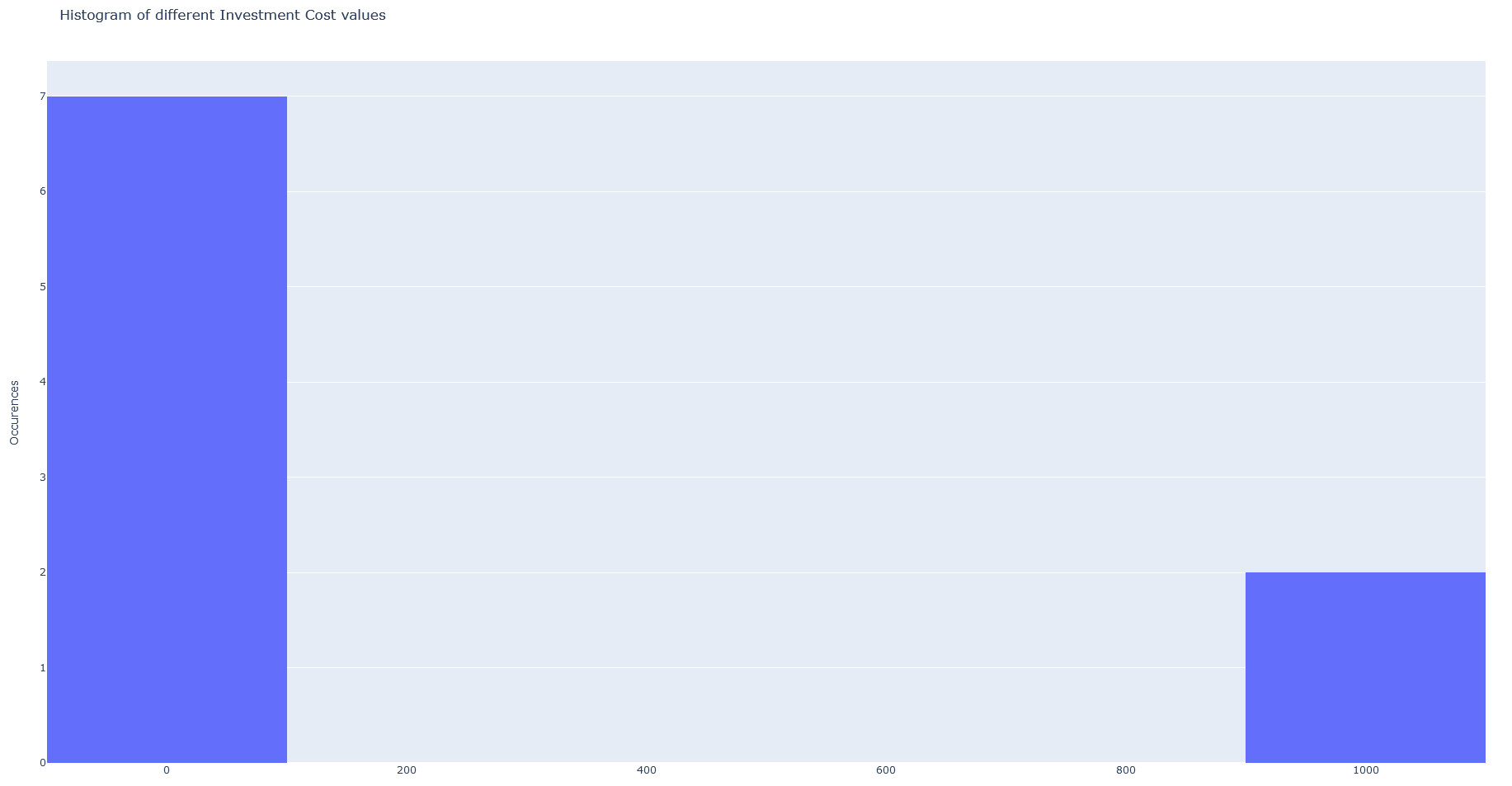
- BibDataManagement.param_histogram(tech, parameter, filename=None, export_format='png', auto_open=True)#
Visualisation of the values found in .bib for a given technology parameter in a histogram, generated from plotly library.
- Parameters:
tech (str) – The technology name to filter the data on.
parameter (str) – The parameter name to filter the data on.
filename (str, optional (default=None)) – The filename to save the exported plot as. If None, the plot is not exported.
export_format (str, optional (default='png')) – The file format to export the plot in. Only applicable if filename is provided. Supported formats are ‘png’, ‘jpeg’, ‘webp’, ‘svg’, ‘pdf’.
auto_open (bool, optional (default=True)) – Whether to automatically open the plot in a new browser tab.
- Returns:
An interactive histogram of the values that the technology parameter has among the literature.
- Return type:
figure plotly object
Examples
>>> bib_object.param_histogram(tech='ANDIG', parameter='cinv')
parallel_coord#
- BibDataManagement.parallel_coord(df=pandas.DataFrame, tech=None, params=None, color_by='paper', filename=None, export_format='png', auto_open=True)#
Visualisation of the values found in .bib for every parameter in a parallel plot coordinates, generated from plotly library.
- Parameters:
df (pd.DataFrame, optional) – The data to plot. If not passed, tech and params can also be used.
tech (str, optional) – The technology to filter the data by, if df is not given.
params (list, optional) – List of string with the params to filter the data by, if df is not given.
color_by (str, optional) – The variable to color the lines by. Among [‘paper’, ‘tech’, ‘set’, ‘combined’].
filename (str, optional) – The filename to save the plot.
export_format (str, optional) – The format to save the plot. Among [png, jpg, html].
auto_open (bool, optional) – Indicates whether to automatically open the plot.
- Returns:
An interactive parallel coordinates plot of the values that the technology has among the literature.
- Return type:
figure plotly object
Examples
>>> bib_object.parallel_coord()

Others#
merge_bib#
- classmethod BibDataManagement.merge_bib(obj2)#
Allows to merge together two BibDataManagement objects.
- Parameters:
cls (BibDataManagement) – Self BibDataManagement instance.
obj2 (BibDataManagement) – The second instance that should be merged with the first one.
- Returns:
A new BibDataManagement instance, resulting from the two references file.
- Return type:
BibDataManagement
Examples
>>> bib_obj1 = BibDataManagement('bibliography.bib', 'parameters_description.csv')
>>> bib_obj2 = BibDataManagement('another_bibliography.bib', 'parameters_description.csv')
>>> bib_full = bib_obj1.merge_bib(bib_obj2)
export_df_to_bibtex#
- static BibDataManagement.export_df_to_bibtex(df, output_path)#
Exports the given dataframe into a .bib file, writing the data in the Notes section.
- Parameters:
df (pd.DataFrame) – Dataframe to export.
output_path (str) – Path of the file to save.
Notes
The path should end by .bib
Examples
>>> bib_data = BibDataManagement('my_bib_file.bib')
>>> stats = bib_data.build_additional_set(from_stat='avg')
>>> bib_data.export_df_to_bibtex(stats, 'my_new_file.bib')
Exported
add_default_values#
- BibDataManagement.add_default_values(pattern)#
Adds an entry to the dataframe, from a string. The string should follow the usual syntax of Bibdatamanagement.
- Parameters:
pattern (str) – A Bibdata entry, between +- to /+-
- Returns:
The name of the technology where default values have been added.
- Return type:
str
Examples
>>> tech_name = bib_object.add_default_values(
...        "+- enhOR# default: [default, energyscope]: that's my general description"
...        "cmaint = 0.5:1:2 [MCHF/(ktCO2*y)]"
...        "cinv = 0:1 [MCHF/(ktCO2*y)]"
...        "refsize = 0 [GW]"
...        "gwp = 0 [kgCO2/kWe]"
...        "lifetime = 0 [y]"
...        "CO2c = 0 [ktCO2]"
...        "+-")
>>> tech_name
enhOR
Notes
The function returns the name of the technology but in fine, the whole entry was added to the instance df.
build_additional_set#
- BibDataManagement.build_additional_set(df=None, from_stat='median')#
Adds another set to a DataFrame from a statistical criteria.
- Parameters:
df (pd.DataFrame, optional) – A frame coming from BibData. If None, the self dataframe from the .bib file is used.
from_stat (str, optional) – The statistic that will be used to add the rows. Choose among [‘median’, ‘avg’, ‘weighted_avg’, ‘min’, ‘max’].
- Return type:
A DataFrame with the supplementary rows.
Notes
The added rows have the value from_stats in the sets column.
The weigths used for the weighted average are the confidence given.
Examples
>>> df_with_avg = bib_object.build_additional_set(from_stat='avg')
>>> df_with_avg
                                                           cite_key  ...     short_name
cite_key      technology_name technology_key                 ...
my_paper_name avion           trl             my_paper_name  ...     tech_ready
                              cmaint          my_paper_name  ...  my_param_name
                              cinv            my_paper_name  ...           Cinv
              avion           trl                            ...     tech_ready
                              cmaint                         ...  my_param_name
                              cinv                           ...           Cinv
[6 rows x 28 columns]
The BibDataManagementES class#
BibDataManagementES inherits from BibDataManagement. Because it has an additional field from the note format, some methods are adapted. Moreover, it has an export designed to be used directly in the model.
- BibDataManagementES.get_data(set_name=None, entry=None, category_name=None)#
Returns a pandas DataFrame containing all data in the .bib file or a subset based on the given technology, set names or category names.
- Parameters:
set_name (str, list, optional) – Name(s) of the set to filter by.
entry (str, optional) – Name of the technology to filter by.
category_name (str, list, optional) – Name(s) of the category to filter by.
- Returns:
DataFrame containing the filtered data, or all data if no filters are applied.
- Return type:
pandas.DataFrame
- BibDataManagementES.export_df(df, output_path, to)#
Exports the given dataframe into a .bib file or an EnergyScope input file.
- Parameters:
df (pd.DataFrame) – Dataframe to export.
output_path (str) – Path of the file to save.
to (str) – ‘bib’ for a reference export, ‘energyscope’ for .dat file input.